
Partner links on this page
Every button below marked partner link leads to the advertiser through a tracking link. If you sign up or install after clicking it, Atom Agentura s.r.o. receives a commission from the advertiser. It costs you nothing extra and the price or offer you get is the same as going direct.
Commission does not buy coverage: the assessments, the criticism and the corrections on this site are written independently of the advertiser, as set out in our editorial policy. RAID: Shadow Legends is free to download and contains optional, chance-based in-app purchases.
Where it runs #
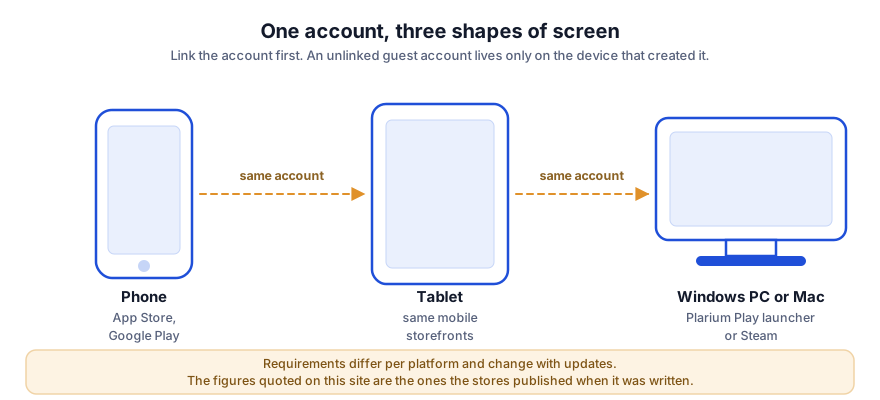
RAID: Shadow Legends runs on iPhone and iPad, on Android phones and tablets, and on desktop through Plarium’s own launcher or Steam. The mobile release came first, on 4 July 2018; the desktop client followed on 21 January 2020, and the Steam release on 9 January 2024.
Mobile requirements, as published #
| Item | Published value |
|---|---|
| Minimum iOS version | iOS 15.0 or later |
| Download size (iOS) | about 280 MB at install |
| Age rating | 13+ on the App Store listing |
| Price | Free, with in-app purchases |
| Android | Requirements vary by device; see the Google Play listing |
| Storage after updates | Substantially more than the install size once asset packs and updates have downloaded |
The listed download is the initial package. A live-service game of this age accumulates assets, so budget considerably more free storage than the store figure if you intend to play for months. We are not going to invent a number for that — it depends on your platform and how much content you unlock.
Windows requirements, as published on Steam #
| Item | Minimum | Recommended |
|---|---|---|
| Operating system | Windows 10 (21H1) or Windows 11 (21H2) | Windows 10 (21H1 or later) or Windows 11 (21H2 or later) |
| Processor | x86/x64 with SSE2 support, or Arm64 | x86/x64 with SSE2, or Arm64 |
| Memory | 8 GB RAM | 8 GB RAM |
| Graphics | DirectX 11 or Vulkan capable | DirectX 11 or later, or Vulkan capable |
| Storage | 5 GB available space | 8 GB available space |
Mac, and a word about emulators #
A macOS client is available through Plarium’s launcher. Plarium does not publish Mac hardware requirements in the same tabular form as the Steam listing, so we are not going to reproduce numbers we cannot source — check the download page for your machine.
Android emulators are popular for this game because it rewards long sessions of repetitive farming. Emulators are a third-party matter between you, the emulator vendor and Plarium’s terms of service; we do not recommend or support any of them, and using one is at your own risk.
Get the version for your device
Free on iOS, Android, Windows and Mac. Check your device’s store listing for the current requirements.
Get RAID: Shadow Legendspartner linkPartner link. Atom Agentura s.r.o. earns a commission if you install through this link. It costs you nothing extra. The game is free to download and contains optional in-app purchases.
One account, several devices #
Progress is held against your Plarium account, not the device, provided you have linked it. Link it before you invest any time: an unlinked guest account can be lost with the device, and recovery is at the publisher’s discretion. Switching between a phone and a desktop with the same linked account is the normal way to play this game.
Data, battery and storage in practice #
- Network: the game is online-only. Battles are short but constant, so it is not suited to a metered connection with a small allowance.
- Battery: a 3D turn-based game with long auto-battle sessions is demanding. Extended farming on a phone will warm it up and drain it; this is the main reason players move to desktop.
- Storage: see the note above — plan for growth.
Languages #
The Steam listing shows English plus a dozen further languages, including French, German, Spanish, Japanese, Korean, Brazilian Portuguese, Russian, Simplified and Traditional Chinese, Turkish and Ukrainian. This site is published in English only.
Read next
- Beginner guideLink your account, then read this.
- Prices and purchasesWhat the shop charges.
- FAQCommon questions, short answers.
Sources
- Plarium Global Ltd — RAID: Shadow Legends official site — https://raidshadowlegends.com/
- Plarium support centre — game mechanics and affinity articles — https://raid-support.plarium.com/
- Apple App Store listing — size, minimum iOS version, age rating, in-app purchase list — https://apps.apple.com/us/app/raid-shadow-legends/id1371565796
- Steam store listing — Windows requirements, release date, purchase labelling — https://store.steampowered.com/app/2333480/RAID_Shadow_Legends/
- Wikipedia — RAID: Shadow Legends (release history, reception, marketing controversy) — https://en.wikipedia.org/wiki/Raid:_Shadow_Legends
Store listings and support pages were consulted on 21 September 2026. Live game figures change with each update: where this page and the publisher’s own information diverge, the publisher’s information prevails.